
Checking invoices and operational documents: where automation fits
Where automation fits in checking invoices and operational documents: extraction, field validation, and what goes to human review.
Mauricio Zaffari
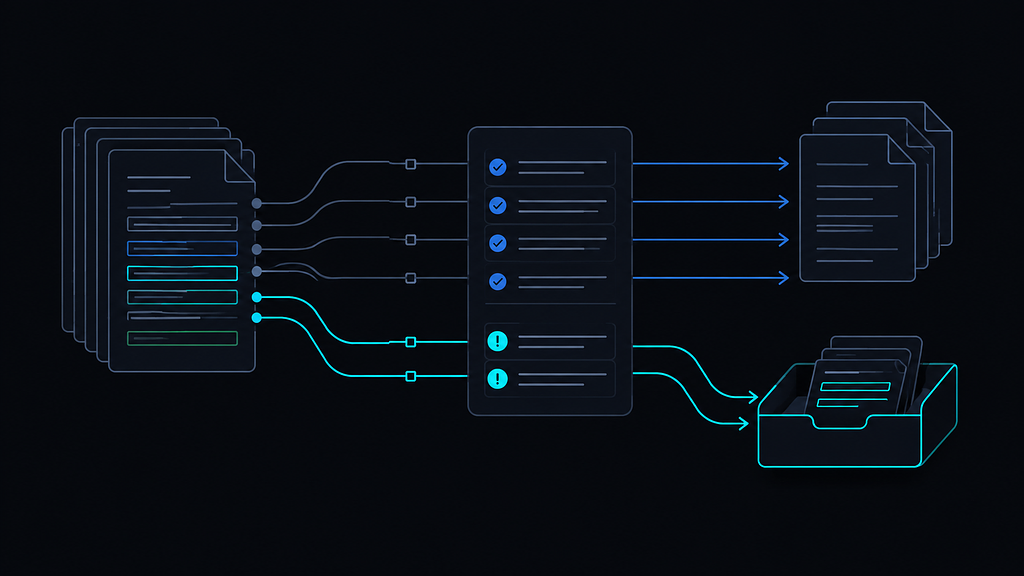
You run document checking by hand, most of the batch passes without trouble, and the team's time disappears into the cases where the document and the system disagree. Use five steps to separate repetitive checks from decisions about mismatches. One hypothetical document runs through all five.
Step 1: separate comparison from decision
What to do: write the checking work as two lists. One is the repetitive comparison: fields against the order, values against the sum, dates against the window. The other is what needs judgment: what to do when they do not match, and who to talk to.
Good looks like: the repetitive list is bigger and boring, and the judgment list names the people who make the calls. Automation will be pointed at the first list only.
Bad looks like: a single blob called "checking", sent to automation as one thing. The fatigue of comparing thousands of fields lowers attention exactly on the cases that need a decision.
Also in this step, check volume and format. Automation pays off where volume is high and layouts are relatively stable; where every document is unique, the setup effort may not pay back. When recurring volume is low, the setup and maintenance effort may not pay back; compare the cost of manual checking against the effort of building the flow.
Step 2: extract the fields
What to do: extract the header, line items, amounts and dates from each document, choosing the extraction path.
Good looks like: the most deterministic path that handles the main volume, parsers following position and format rules, with a language model saved for the layouts rules do not cover. Evaluate field by field: an aggregate accuracy figure can hide repeated errors in a critical field, like the total value or the access key.
Bad looks like: choosing the model for everything because the demo looked impressive, and measuring accuracy only as a whole. Predictable, explainable extraction is easier to fix when a field comes out wrong.
In a hypothetical example, the document arrives as a PDF from a known supplier, with a header and line items. Extracted: issue date, supplier identifier, total value, item lines.
Step 3: validate against the system
What to do: check whether the extracted fields make sense and match what the system already has. Split the validations into three groups: (1) format and consistency, such as a valid supplier identifier, coherent dates and the item sum; (2) cross-checks against the system, such as confirming the order exists and the supplier is registered; and (3) business rules, such as approval limits and difference tolerances.
flowchart TD
    A[Invoice] --> B[Field extraction]
    B --> C[Validation against order]
    C --> D{Fields match?}
    D -- yes --> E[Ready for the next step under defined rules and permissions]
    D -- no --> F[Human review queue]
    F --> G{Human decision}
    G -- cleared --> E
    G -- held --> H[Handled outside the flow]
Good looks like: every validation has an answer defined before it runs. If the field does not match, where does the document go? Tolerances are written down, because tolerance is a business decision, not a technical one. Differences within a documented tolerance may proceed; the rest go to review.
Bad looks like: automation producing a list of errors nobody knows how to handle. A list is not a process until each item has a destination.
Back to the document. The supplier identifier matches the registration. The total matches the sum of the items. Two things fail: the issue date is outside the window expected for that order, and one item's price came in above the agreed price.
Step 4: route divergences to a human queue
What to do: classify each divergence with a business criterion and send it to a review queue ordered by that criterion. Not every divergence is an error, and not every divergence deserves the same attention: a few cents on freight can be tolerated, a registration mismatch can point to a recurring supplier problem.
Good looks like: the reviewer opens the queue and sees what needs a decision, with the two divergences tagged, one as issue date and one as price. The queue orders both by the operation's criteria. Automation read, compared and organized. It did not decide whether the price difference was acceptable, and that boundary is deliberate.
Bad looks like: the machine deciding alone, or the document posted blindly because the queue is a bucket nobody watches. Both lose the trust of whoever runs the checking.
Step 5: measure and keep the pilot honest
What to do: track the share resolved without review, queue volume and time to decision, and errors found later through audit or process feedback.
Good looks like: the numbers exist, they are reviewed at the end of the pilot, and they drive a decision: adjust the scope or stop. There is no guarantee of savings. There is a hypothesis, a set of criteria and a result observed in the pilot.
Bad looks like: declaring success because documents now flow, with no measure of what stayed outside the automatic part.
On timelines: a diagnostic is usually planned for 2 to 3 weeks. A checking pilot is usually estimated at 4 to 6 weeks after the scope is defined, depending on the documents, the access and the integrations involved.
In summary: the five-step checklist
- Step 1: two lists, comparison and judgment, automation pointed only at the first.
- Step 2: deterministic extraction for the main volume, evaluated field by field.
- Step 3: validations with defined answers and written tolerances.
- Step 4: divergences classified and queued, decided by a person.
- Step 5: the measures tracked, and a decision taken on them.
Run the five steps on one document type before scaling. If a step cannot pass its good test, that is where the diagnostic should look first.
Want to assess where this applies in your operation? Request a diagnostic