
Integrating AI without replacing your ERP: how the connection works
How to connect AI to the systems your company already runs, without replacing the ERP. Integration types, alternatives and what to plan.
Mauricio Zaffari
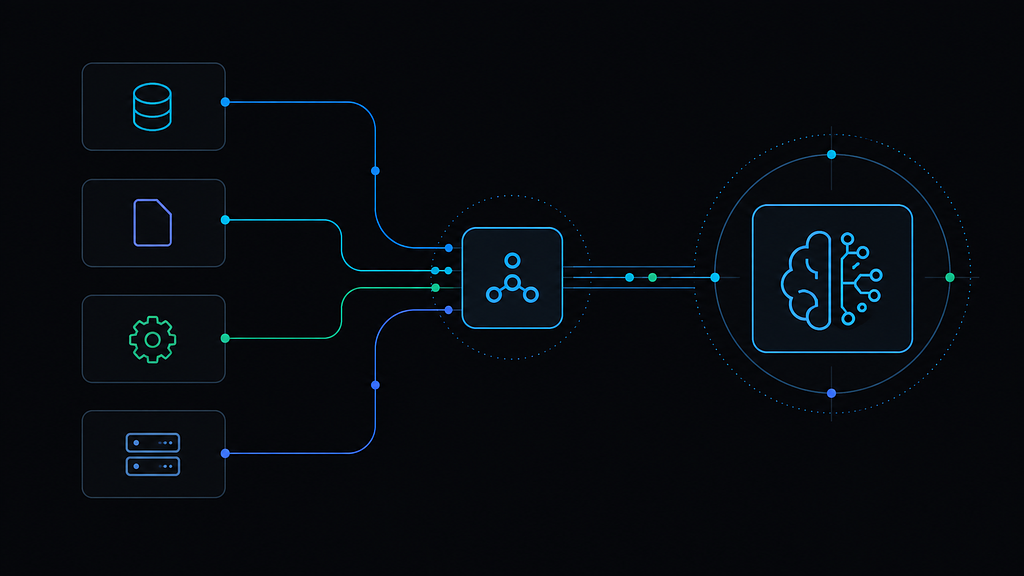
One way to connect AI to existing systems:
flowchart LR
    ERP[ERP] --> INT[Integration layer]
    TMS[TMS] --> INT
    DB[Database] --> INT
    TEL[Telemetry] --> INT
    INT --> AI[AI solution]
    AI --> OUT[Decision / action / alert]
    OUT --> FLOW[Return to people or a system, depending on access]
Four possible inputs feed an integration layer and an AI module. The output can go to the team or a system, depending on available access. This design does not require an ERP replacement; each boundary needs a decision.
Use the four stops to assess an integration proposal: data sources, interfaces, access and where the output goes. For this illustrative example, assume the TMS has no public API but can export periodic reports.
Stop 1: the sources stay sources
The ERP, the TMS, the database and the telemetry platform keep their roles. The order stays in the ERP, freight records stay in the TMS. The AI layer reads them and returns information to the same flow.
The call: read, do not migrate. The systems already running stay the source of truth, and the AI layer reads from those sources and delivers an output to the workflow without replacing the systems of record.
Why: replacing an ERP is a multi-year project with impact across the whole operation. Integration can be scoped to one flow to test feasibility before considering larger changes.
What would change the call: a source that is being decommissioned anyway, or a system so unstable that reading it is less reliable than replacing it. Those cases need separate assessment during the diagnostic.
Stop 2: the interface at each boundary
Every arrow from a source into the integration layer is a decision about the interface. In practice, three kinds appear:
- APIs, when the system exposes a stable, documented contract. Direct exchange, authentication, access control, the easiest path to monitor and version.
- Database reads, when there is no API. It works, with care: understand the data model, respect the load on the production system, and treat the read as sensitive. We read, and avoid writing straight to system tables.
- File imports, in closed systems and government platforms: CSV, XML or custom formats. Some platforms also require a digital certificate for access.
In this illustrative example, the TMS has no public API but supports periodic report exports. Three ways to draw its arrow:
- a report exported from the TMS and imported by the integration layer;
- controlled reads from a specific table or view, if the vendor authorizes and the load is acceptable;
- an intermediate export done by the team, feeding the AI layer without giving it direct TMS access.
The call: the file import. The process tolerates batch updates, the team can seek vendor approval for the export, and the pilot measures the process, not the transport.
What would change the call: an operation that needs near real-time freight data. Then controlled reads become worth the vendor conversation and the performance care. The decision follows the update frequency the process actually needs, not the elegance of the interface.
Stop 3: the access gate
Between the interfaces and the integration layer sits one item that can delay a project: credentials. Treat it as part of the design, not as an infrastructure detail.
- who authorizes access, through which internal process;
- which account will be used, with the minimum permissions the flow needs;
- how credentials are stored and rotated;
- which environments are connected: production, staging or a copy;
- which network restrictions apply: VPN, firewall, allowed IP ranges.
The call: read credentials, scoped to the process, expanded only with justification. Writing to a source system comes in only when the flow requires it, with rules and a record of every action.
Why: broad access solves today and creates risk later. Minimum access is slower to arrange and cheaper to live with.
Stop 4: the return path
The right edge of the diagram is where most proposals go vague. The output has to land somewhere: a decision shown to a person, an action written back to a system, an alert routed to a queue. The annotation here names the destination and the rules of the return.
In the TMS example, the output goes to the operation team, in the flow they already use. Writing back into the TMS would require vendor-approved writes, which the interface chosen for this example does not offer, so the return is to people, not to the system. That is a design consequence, and it is better written down at this stop than discovered at deployment.
Reading the diagram against your own systems
Integration is decided in the diagnostic, while the scope can still change. When identifying where AI makes sense, the diagnostic is usually planned for 2 to 3 weeks, and part of it is exactly filling in this diagram: which systems take part, which interfaces each one offers, who authorizes access, what update frequency the process needs, and which data is sensitive.
The pilot is usually estimated at 4 to 6 weeks after scope is defined; access and data dependencies found in the diagnostic can still affect that schedule.
Mapping dependencies early helps plan the pilot, but does not eliminate technical risk or adoption work.
In summary
The architecture is boring on purpose: sources stay sources, the interface at each boundary follows what the system offers and the update frequency the process needs, access is scoped to the minimum, and the output returns to the team or a system, depending on available permissions. A missing API defines the design, it does not end the project. Before building, check whether the proposal defines sources, interfaces, access and where the output goes.